TechSupp247

All your technical support needs under one roof

Microsoft Windows

We support Windows Xp, Vista and Seven.

Browser Support

We support all browsers, you name it and we can help you with it.

TechSupp247

Got Computer problems?, Log on and chill

Hardware Support

Desktops, laptops, handhelds, printers, scanners the list is never ending.

Email Clients Support

Outlook, thunderbird, eudora, outlook express we support all.

Showing posts with label Tech Supp. Show all posts

Aug 10, 2011

Google+ tips


How to Update Your Facebook Status from Google+

If you are spending a lot of time checking out Google+ and don’t want to neglect your Facebook friends, you can easily share your Google+ updates with Facebook and you don’t need additional software or extensions.
  •  First, you need to get the upload email for your account from Facebook. To do this go to Facebook and login to your account. Then go to http://www.facebook.com/mobile/.
  • Go to the upload section and copy the address for your personalized upload email.

Aug 9, 2011

Skype disallow third party ads


Skype for Windows: Disallow Usage of Your Information for Third Party Ads


By default, Skype allows the usage of “non-personally identifiable information” about you when serving third party ads. If you are uncomfortable with this do to privacy concerns, you can change the default setting for your Skype to disallow this.

Jul 25, 2011

Enable Save Tabs Upon Exit


In order to get your tabs and windows back from the previous session, you should close Firefox from the menu: At the top of the Firefox window, click on the Firefox button (File menu in Windows XP) and then click Exit. If you close each window or tab, only the final window or tab that you closed will be available when you restart Firefox.Prior versions of Firefox would ask “Do you want Firefox to save your tabs for the next time it starts?” when exiting the program. FF4 no longer has this feature enabled by default. Here is how to turn it back on.

Jul 20, 2011

How to Delete Internet Explorer Toolbars


An Internet Explorer Toolbar is an optional program that increases the functionality of Internet Explorer by enabling PC users to perform certain tasks within their browser. While toolbars can be helpful in providing a quick access to frequently used programs and services, Internet Explorer toolbars can slow the performance of a PC. As a result, it may be helpful to delete Internet Explorer toolbars. One of the easiest and safest ways to remove toolbars from Internet Explorer is by using the Windows Add/Remove Programs tool.

Jul 15, 2011

Add Caption To A Photo Album


Photo albums help in creating great memories for all and keep them alive for decades. we can make photo albums using Microsoft power point. We can add photos and give captions for each photo.

Jul 14, 2011

Firefox tips


How to Fix if Location bar Searches are Affected

If a term is entered in the Location bar, Firefox sends a request to your ISP to see if the term is actually a website address. If the server returns a no-such-domain error, Firefox will then initiate a search using the site listed in the keyword.URL preference . A number of ISPs and DNS servers are set not to return a no-such-domain error, and will redirect to their own search site instead.Make sure that the keyword.URL preference is set to the search site you want and that it's turned on.

Registry Care

The Windows Registry is a hierarchical database that stores configuration settings and options on Microsoft Windows operating systems. It contains settings for low-level operating system components as well as the applications running on the platform: the kernel, device drivers, services, SAM, user interface and third party applications all make use of the registry. The registry also provides a means to access counters for profiling system performance.

Jul 13, 2011

Registry Repair Pro

Tired of Windows crashing? Sick of having software lock up or taking forever to load? The problem could be all of those incorrect registry entries caused by software installation and un-installations that went awry.

As you use Windows, over time the registry becomes unnecessarily bloated and often times corrupted, all because various programs fail to update and/or delete unneeded settings. This leads to longer startup times, slower performance and eventual failure of different hardware components, software or the Windows operating system.


Jul 12, 2011

Advanced Registry Supervisor

Advanced Registry Supervisor is a powerful tool for managing system registry.

With Advanced Registry Supervisor you can safely clean, repair and optimize the Windows registry with a few simple mouse clicks.


Problems with the Windows registry are a common cause of Windows crashes, slow performance and error messages. If you don't fix registry problems when they arise or try and prevent them from even happening at all, then you may soon find yourself faced with sudden crashes, system stalls, or a severe degradation in operating speed.


Working to fix registry issues and prevent system crashes should be a top priority whether you use your computer for business or pleasure, and you'll find a greatly enhanced computing experience by doing so.

By using Advanced Registry Supervisor regularly and fixing registry errors your system should not only be more stable but it will also help improve your systemperformance without expensive hardware upgrades.


With a few easy steps Advanced Registry Supervisor will scan your entire registry for any invalid entries and provides a list of the registry errors found, you can then choose to selectively clean each item or automatically repair them all.


Features of Advanced Registry Supervisor:
  • Scan 12 most important Windows Registry sections;
  • Fix error's found;
  • Restore Windows Registry;
  • Create test result report;
  • Customizable toolbar;
  • Install/Uninstall;
  • OS supported: Windows All;
  • Help is included;
Requirements:

Jul 11, 2011

Internet Explorer Tips


Internet Explorer Quits When You Attempt to Browse Shockwave or Flash-enabled Site
When you attempt to browse a Macromedia Shockwave-enabled or Flash-enabled Web site, you may receive an error message similar to the following:

When you click the Details button, the following information is displayed:
IEXPLORE caused an invalid page fault in module DIRAPI.DLL at address.Internet Explorer may then quit.
This issue can occur if the Dirapi.dll file is missing or damaged. This file is required by the Shockwave Player and Flash Player for proper operation.
NOTE: This behavior can also occur when you attempt to install Macromedia Shockwave or Flash.

EasyCleaner

EasyCleaner is a little application that was developed to search Windows' registry for entries that are pointing nowhere.

Deleting these entries will speed your computer up. But as you already might know, deleting entries from registry can be dangerous for your computer, so it is wise to make a backup of your registry.


EasyCleaner also lets you delete all kinds of unnecessary files like temps, backups etc. You can search for duplicate files and you can view some intresting info about your disk space usage! ToniArts may not be held accountable in any way if EasyCleaner affects your computer in a negative way.
Features of EasyCleaner:
  • Finds invalid registry entries - deleting them speeds up your computer up to 20%!
  • Finds duplicate files - deleting them will free disk space!
  • Finds all unnecessary files like backups, temps etc.
  • Very user friendly!
  • Shows some interesting info about your disk space usage.
  • Very customizable.
  • Uses only little amount of resources while running!
  • Huge help file which gives you every little detail about EasyCleaner!
Requirements:

Jul 8, 2011

IE9: Set multiple home pages for a pinned site


The pin site to the taskbar feature in IE9 is very useful when you want to visit a site quickly. It is even more handy when you can group a number of sites in a pinned site and launch all of them in one click.

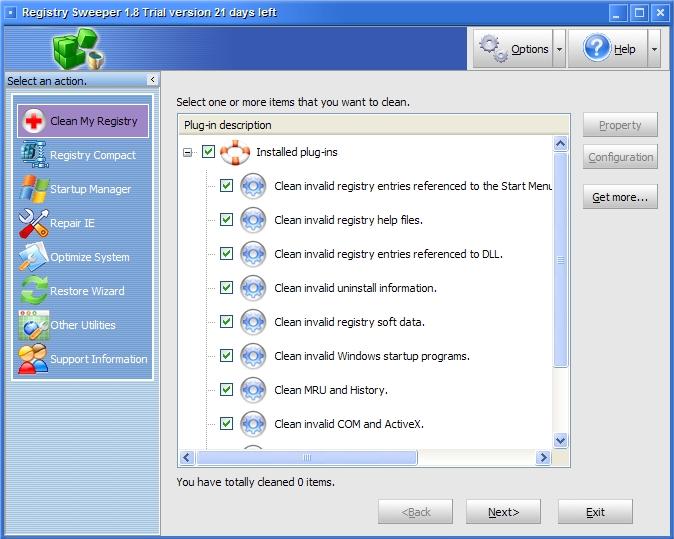
Registry Sweeper

Do you often download and install software from the Internet and uninstall it after a while? Many uninstall programs, however, can't completely remove everything from your computer as you believe - information written into the registry by the application may still remain there - by and by your registry file will be larger and larger, your system will be slower and slower, or even run into malfunctions.


Jul 7, 2011

PC Registry Cleaner

Did you know that over 94% of PCs have hidden corrupt and dangerous files with over 150 hidden errors and bugs on them?

Over time your Windows registry becomes saturated with redundant files and broken links that cause errors and even system crashes. Using our registry cleaner and registry repair software will get rid of all those unnecessary files that swamp your PC and end up wreaking havoc.


Running our registry cleaner and registry repair software on a regular basis will boost your system performance, remove hidden Errors and bugs, and prevent system crashes. What is the windows registry and why do you need a registry repair/registry cleaner to keep it error free? Every Microsoft Windows operating system has a registry.

 
Your system registry is one of the most vital and important components on your PC, it holds a wealth of information about your computer setup and configuration.

When you delete a file or uninstall a program, the registry keeps a reference of that deleted file and does not remove it, thus, an invalid data or error stays in the registry, as the registry gets filled with these invalid data and errors, your computer system will become sluggish and can cause severe system complications resulting in system crash, hang and malfunction.


Download our top rated registry cleaner/registry repair software and SCAN YOUR PC FOR FREE, find out if your PC is corrupted with errors and bugs before it is too late.


Features of PC Registry Cleaner:
  • Prevent and eliminate system Crashes
  • Remove invalid registry entries
  • Remove hidden bugs and system errors
  • Scan your hard drive for invalid shortcuts
  • Manage your system startup menu
  • Optimize your internet speed
  • Optimize your system ram memory
  • Fix application shutdown errors
  • Fix registry errors
  • Windows registry cleaner
  • Windows registry repair
Requirements:

Jul 6, 2011

MISPBO Registry Cleaner

MISPBO Registry Cleaner is an advanced registry cleaning utility. The main function of is to allow the removal of unnecessary keys from the Windows Registry. It can also backup and defrag the registry.

MISPBO Registry Cleaner will fix hidden bugs and errors on your PC and increase the overall performance speed of your computer by as much as 350%. Statistics show that 93.7% of personal computers have corrupt and potentially dangerous files with 150 or more errors on them.

:
  • Missing file associations
  • Invalid device drivers
  • Invalid application paths
  • Missing DLL files
  • Missing help files
  • Missing system fonts
Requirements:

Registry Rinse

Registry Rinse is Registry-cleaning software. It will safely clean and repair Windows Registry problems with a few clicks and enable you to enjoy a cleaner and more efficient PC.

The Registry is the nerve center of your PC, and problems with the Windows Registry are a common cause of Windows crashes and error messages.
 

Jul 5, 2011

Firefox tips


The Mozilla Firefox's local area network settings allows you to specify how Firefox connects to theInternet. Although the network settings are typically controlled by the operating system, the Firefox settings allows you to change how Firefox connects to the Internet. Specifically, you can setup Firefox to use a proxy server, which conceals your true Internet protocol, or IP, address.

This article will help you to get in to LAN settings in Firefox.

Jun 9, 2011

Prevent Columns or rows From Spilling

We can avoid columns and rows from spilling over the edge by adjusting the sheet content or by shrinking the sheet. So that it will be one page wide or one page tall.

Jun 7, 2011

Slides Are Not Printing in Color

In Microsoft Power point sometimes we may not be able to print the slides in color or preview them in color. We can easily overcome it by making a simple adjustment.

Jun 3, 2011

Internet Explorer 9 tips


IE 9: Change Website Icons Pinned to Taskbar


With the new IE 9, users can pin websites to the taskbar. However, a website’s default favicon may not blend well with other icons in your theme. This will show you how to customize these icons.Display beautiful, informative website icons like these.


Steps to Follow
  •  Right click on your desktop -> New -> Shortcut.

Twitter Delicious Facebook Digg Stumbleupon Favorites More